Walk-ins & self-pick
Not every visit is booked in advance, and not every booking has a name on it yet. This page covers the two everyday situations that go beyond a neat, pre-assigned appointment: walk-ins and unassigned jobs your team can pick up.
Walk-ins
A walk-in is a customer who arrives without an appointment. To serve them, create a booking and mark it as a Walk-in:
- Select New booking.
- Choose Walk-in instead of an existing customer (you can still add their name).
- Add the service(s), pick who's doing it, and save.
The walk-in now appears on the calendar like any other booking, so it counts toward the day and gets paid for in the usual way.
Unassigned bookings
Sometimes a booking has no team member yet — most often when a customer books online and chooses "any available". These land in the Unassigned column on the calendar so they never get lost. Anyone can then take them on.
There are two ways an unassigned booking gets a name against it:
- The owner or front desk assigns it — open the booking and choose a team member.
- A team member picks it up themselves — see below.
Self-pick: staff pick up a job
A team member can take on an unassigned job in two places:
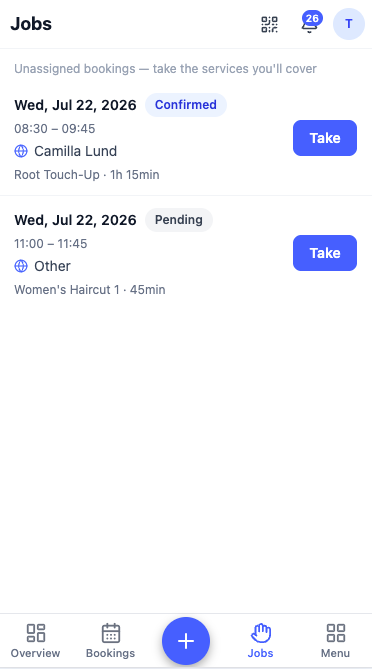
From the Jobs tab. The mobile app has a Jobs tab that lists unassigned bookings, each with a Take button — handy when someone has a free slot and wants to grab the next customer.
From the booking itself. Opening an unassigned booking, a staff member can choose Take this booking and tick which services they'll cover — the rest stays open for a colleague.
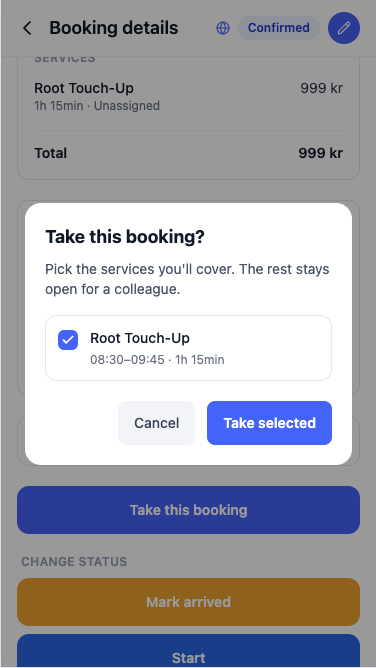
- Whoever picks it up first gets the job; if someone else already took it, the app simply says it's no longer available.
- Once picked up, the booking moves out of Unassigned and onto that person's column on the calendar.
This keeps busy days flowing: online "any available" bookings and walk-ins get shared out fairly, without the owner having to hand out every job.
Next: Services & categories →